3D anatomy atlas: learnanatomy.org
A free 3D anatomy atlas for medical students that runs in the browser. Show, hide, cut and quiz yourself on 3,873 structures with Latin and English names. No sign-up, no tracking.
#web #software2 min readLast updated
- Role
- Design and development
- Timeframe
- –present
- Team
- Individual
- Status
- In progress
- Tools
- TypeScript, React, three.js, Blender, glTF Transform, Playwright
- Links
Layers
A reduced copy of the atlas model. Drag the red line to take the muscles off or put them back, and drag the body sideways to turn it.
Open the full atlas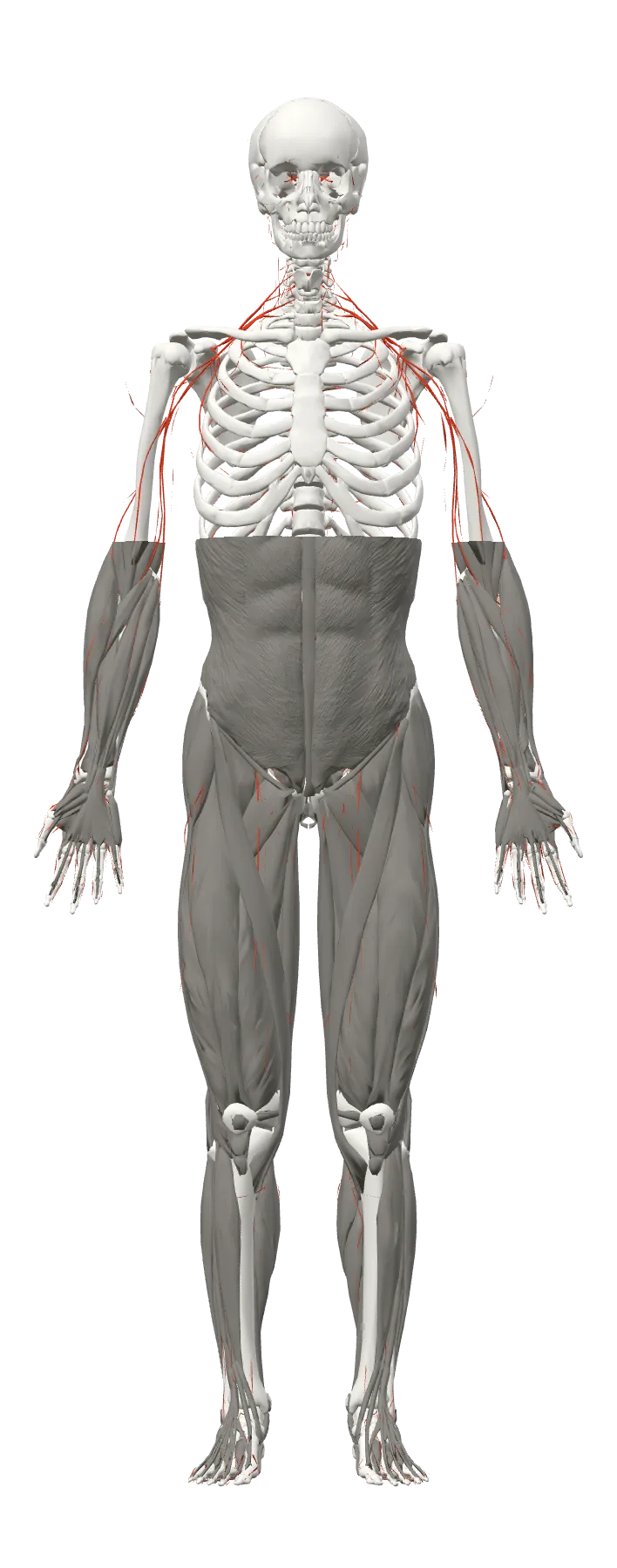
GLB 2.8 MB · 394,252 triangles
Model: Z-Anatomy, BodyParts3D © DBCLS · CC BY-SA 4.0. Reduced for this page from 3,144,131 to 394,252 triangles, same licence.
- structures in 3D
- 3873
- body systems, each a layer
- 9
- quiz modes: find it, pick it, name it
- 3
- sign-ups, trackers or servers
- 0
What it is
learnanatomy.org is a free 3D anatomy atlas for medical students. It runs in the browser, with nothing to install and no account. Nine body systems are layers that can be shown, hidden, made transparent or seen as an X-ray: the skeleton, muscles, muscle attachments, joints, organs, heart and vessels, lymphoid organs, the nervous system and the skin’s regions. Every structure has its Latin and English name following the Terminologia Anatomica, and the interface is in German and English. It is meant for learning, not for diagnosis.
What you can do with it
- Search in Latin, English and synonyms, or browse the tree of structures. The info panel shows a short definition from Wikipedia, marked as unreviewed until a person has checked it.
- Isolate a structure, alone or with its surroundings, cut the body with sagittal, coronal and transverse planes, or pull it apart in an exploded view.
- Quiz yourself: find a structure in 3D, pick its name from a list, or type it (small typos are accepted). Spaced repetition brings back the ones you got wrong.
- Share a view: the link holds the layers, the selection, the cutting planes and the camera.
How it works
The anatomy comes from Z-Anatomy, an open 3D atlas built on BodyParts3D, both under CC BY-SA licences. Its Blender file holds about 7,000 objects. An asset pipeline runs Blender without a window to export each body system, converts it to the atlas’s coordinates (metres, up is up, the body faces forward, true left and right) and checks that every left structure is on the left. Then glTF Transform and meshoptimizer simplify, quantize and compress the meshes into one GLB file per system. The build stops on any orientation or side error.
The viewer is React with three.js. Each body system is drawn as one batched mesh, so thousands of structures need only a few draw calls. The site is static, hosted on Cloudflare Pages, with about 6,000 pages generated for search engines, one per structure. Unit and component tests run with Vitest, end-to-end tests with Playwright on a desktop and a phone screen size.
The model on this page
The figure above is a reduced copy of three of the atlas’s systems: 269 bones, 534 structures of the nervous system and 609 muscles. Each layer is joined into one mesh and simplified to an eighth of its triangles, which brings the three systems from 17.5 MB to 2.8 MB. The red line is a clipping plane on the muscles.